This section describes the control features in Varwin XRMS on the Vive Focus, Vive Focus Plus, and Vive Focus 3 mobile headsets
Vive Focus
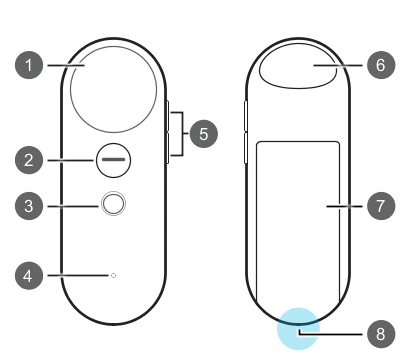
| № | Designation |
|---|
| 1 | Touchpad |
| 2 | “Application” button |
| 3 | “Home” Button |
| 4 | Status Indicator |
| 5 | “Volume” Button |
| 6 | Trigger |
| 7 | Battery compartment |
| 8 | Bracelet hole |
Management
- Press the trigger to interact with objects
- To teleport, press and hold the touchpad to aim and release to teleport
- To discretely pivot left/right, press the right/left side of the touchpad
- To take or release an object, press the “Append” button
- To exit the project to the connection screen, press and hold the “Apps” button for two seconds
- To access the Vive Focus system menu, press the Home button
- Press the touchpad or trigger to interact with interface elements
Vive Focus Plus
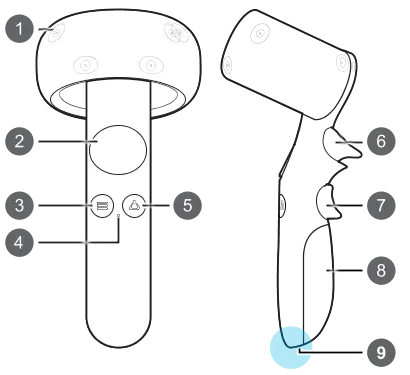
| № | Designation |
|---|
| 1 | Tracking sensor |
| 2 | Touch pad |
| 3 | “Menu” button |
| 4 | Status indicator |
| 5 | “VIVE” button |
| 6 | Trigger |
| 7 | “Grab” button |
| 8 | Battery compartment |
| 9 | Bracelet hole |
Management
- Press the trigger to interact with objects
- To teleport, press and hold the touchpad to aim and release to teleport
- To discretely pivot left/right, press the right/left side of the touchpad
- To grapple or release an object, press the “Grab” button
- To exit the project to the connection screen, press the “Applications” button
- To bring up the Vive Focus **system menu, press the Home button
- Press the touchpad or trigger to interact with interface elements
Vive Focus 3
Top view
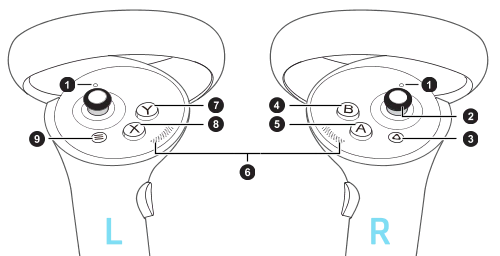
| № | Designation |
|---|
| 1 | Controller indicators |
| 2 | Joystick |
| 3 | “VIVE” button |
| 4 | B Button |
| 5 | A Button |
| 6 | Thumb rest |
| 7 | Y Button |
| 8 | X Button |
| 9 | “Menu” button |
Front and side view
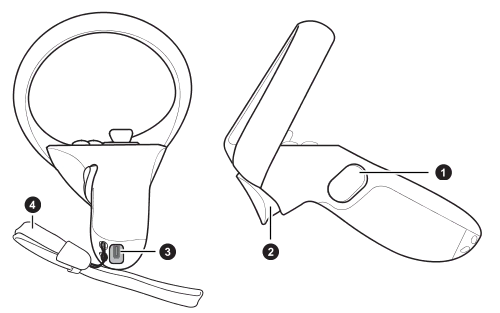
| № | Designation |
|---|
| 1 | “Grab” button |
| 2 | Trigger |
| 3 | USB Type C port |
| 4 | Bracelet |
Control
- Press the trigger to interact with objects
- To teleport, twist the joystick forward/backward to aim, and release it to teleport
- To discretely turn left/right turn the joystick to the corresponding side
- To grapple or release an object, press the “Grab” button
- To exit the project to the connection screen, press the “Applications” button
- To bring up the Vive Focus system menu, press the Menu button
- Press the trigger to interact with interface elements